This hitem3d vs meshy ai comparison focuses on the decisions that matter after the demo: how you start, how much control you have, what the output is good for, and how easily it fits your workflow.
Neither tool is automatically best for every creator. The right choice depends on whether you value a focused path from idea to model or a broader workspace for iteration and refinement.
A comparison is more useful when each dimension is tied to a real task. Use these profiles to match the tool to the job rather than judging either one from a single showcase image.
The fast concept artist
You have a character, prop, or creature idea and want a visual 3D starting point without building a complex pipeline first.
hitem3d is the simpler first stop when reducing setup matters more than tuning every generation parameter. See the focused workflow in the hitem3d ai-powered 3d model generator guide.
You expect to regenerate, texture, inspect, and revise several versions before sending a model into a larger production workflow.
meshy ai may be more attractive when you want a broader creative workspace. Compare every version in your target software rather than relying on the preview alone.
You are starting with a clear object idea and need an understandable path from prompt or reference to an editable result.
A focused interface can make hitem3d easier to approach, especially when your first goal is learning how prompts and references affect shape. The hitem3d tutorial for beginners covers the first checks to make.
You want a model for a physical prototype, figurine, or experiment and care about geometry that can survive cleanup and slicing.
Neither generator removes the need to inspect walls, intersections, scale, and supports. Use the comparison as a starting point, then follow the hitem3d alternative discussion if print preparation is your deciding factor.
Switching between generators does not require rebuilding your entire process. Preserve the creative brief, change one input at a time, and compare outputs under the same downstream conditions.
1
Keep the brief consistent
Save the same subject, viewpoint, style, proportions, and must-have details before testing either tool. A stable brief makes the comparison more meaningful than changing the prompt and the generator together.
2
Regenerate the weakest link
If the silhouette is wrong, revise the description or reference. If the silhouette works but the surface is messy, test another generation and plan for cleanup rather than expecting a perfect first pass.
3
Validate in your destination app
Open the selected model where it will be animated, rendered, edited, or prepared for printing. Check scale, topology, texture behavior, and export compatibility before committing to a longer workflow.
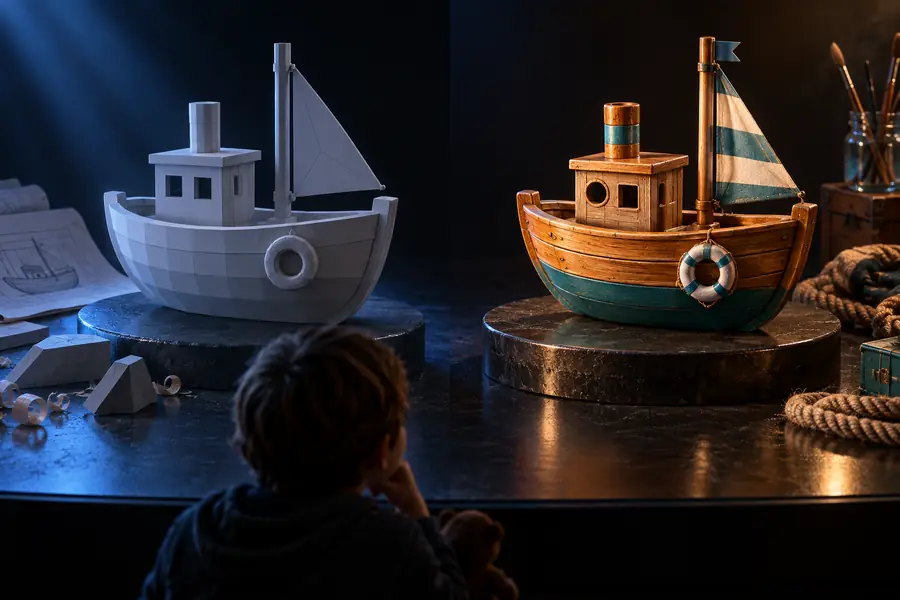
A visual quality check
A strong preview is not the same as a production-ready asset. Compare the overall silhouette first, then inspect the details that determine whether the model can move, render, or print cleanly.
Generated starting point
Checked and refined result
Treat both outputs as starting points; the destination workflow decides what is usable.
Where the comparison has limits
A fair review should state what neither generator can guarantee. These caveats are part of choosing well, not reasons to dismiss AI-assisted modeling altogether.
No prompt guarantees exact geometry
A detailed description can still produce incorrect proportions, hidden intersections, or missing secondary features.
Workaround
Use a reference image, simplify the brief, and regenerate before manual cleanup.
Preview quality is not topology quality
A model can look convincing from one angle while having stretched faces, weak connections, or awkward seams.
Workaround
Orbit the mesh, inspect close details, and run normal or topology checks in your 3D software.
Neither tool replaces downstream editing
Animation, game-ready optimization, UV work, rigging, and print preparation usually require additional tools and decisions.
Workaround
Choose the generator for the starting point, then budget time for the task-specific finishing stage.
Feature comparisons can change over time
AI products update interfaces, models, export paths, and limits frequently, so a snapshot comparison can age quickly.
Workaround
Test the current workflow on a small representative asset before moving a whole project.
Make the comparison on your own asset
Start with the model you actually need
The most reliable way to decide between hitem3d and meshy ai is to test one representative brief: a subject with the proportions, surface detail, and intended use you care about. Compare the generated shape, the amount of cleanup, and the ease of moving it into your next tool.
These answers cover the practical questions people ask when comparing the two AI 3D modeling options.
hitem3d is positioned as a focused path from an idea or reference toward a 3D model. meshy ai is commonly considered when a creator wants a broader set of generation, texturing, or iteration controls. The meaningful difference for you is which workflow creates less friction after the first output.
It can be easier for beginners when the priority is understanding one straightforward concept-to-model flow. meshy ai may suit beginners who are willing to explore more controls and learn a wider production process. In either case, start with a simple object and inspect the result instead of judging only the thumbnail.
There is no universal winner because output quality depends on the prompt, reference, subject, style, and intended use. Compare silhouette accuracy, detail placement, surface continuity, and cleanup time on the same brief. A visually impressive model may still be the weaker choice if it fails your export, animation, or printing needs.
Usually, the practical route is to export a model and continue refinement in a separate 3D application rather than treating either generator as a complete round-trip editor. Check the current export formats and re-import behavior before planning a handoff. Keep the original prompt and reference so you can regenerate if the first mesh is difficult to repair.
Access terms can change, so compare the current limits, export options, and usable output rather than relying on an old claim about free access. A free generation that requires extensive repair may cost more time than a result that fits your workflow immediately. Test a small asset first and record the steps needed to reach a usable model.